

What is WordPress?
WordPress is an incredibly popular website content management system and blogging platform, its use has grown exponentially in recent years as a result of website owners requesting to have some level of maintenance or update control over their website or as a news tool to post what’s happening in a blog. It is estimated that WordPress is used to power 23% of the internet, that’s somewhere in the region of 60 million websites. If your website or blog is built using WordPress then it’s imperative that you have a website administrator.
How do I find out if my website uses WordPress?
You can use http://builtwith.com to find out. Simply enter your website address and look down the ‘Technology Profile’ list for mention of WordPress, if it’s listed, you’re using it.
Yes my website is using WordPress but why do I need an administrator?
The simple answer is to prevent your website from being vulnerable to hackers or being hacked and consequently having a negative impact on your brand or image.
Without getting too technical WordPress is an open source platform, meaning anyone can analyse the underlying code and take advantage of any vulnerabilities they might find. Not only that but hackers can also target any vulnerable plugins you or your web designer may have installed. Once your site has been hacked, the hacker can carry out a whole host of malicious activity, not least taking down your website and displaying their own on your domain name. Hackers are clever, sometimes your site may look normal, you probably won’t even be aware it has been hacked, but the hacker may then be using your site/hosting to carry out other hacks, redirect traffic or send out bulk spam emails.
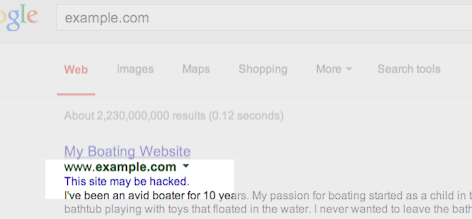
If you are unfortunate enough to be hacked the first indication you may get might be from a potential customer searching on Google or other search engine. Google can tell when sites have been hacked and often display a message in the search engine results under a listing stating ‘This site may harm your computer’ or ‘This site may be hacked’. This message is shown to deter potential visitors from viewing your website, not a great first impression or method of advertising I’m sure you’ll agree.
The good news is that when a vulnerability is detected, the WordPress team and the plugin community are quick to fix the hole and as such updates are regularly rolled out, unfortunately these updates do not happen automatically, an administrator is required to ensure updates are compatible and implemented in a timely manner.
Shouldn’t my web designer be maintaining WordPress for me?
That depends, many web designers simply move on to the next project or expect you to maintain your WordPress site. As such regular critical updates are missed leaving your website open to attack.
Who can I use to administer my WordPress site?
The answer is me, I currently maintain and am administrator for more than 100 WordPress sites and blogs. I am happy to carry out the following tasks for a small monthly fee:
- maintain regular WordPress Core and Plugin updates when they are released,
- install and maintain tools to prevent hackers,
- install and maintain an offsite back up of your website files and database.
Please get in touch to discuss your requirements.